
Quello is a decentralized question-answer platform based on Hive where you can earn money (or cryptocurrency) just by posting questions and answers. Or you can just say, Quello, is a question-answer platform(Dapp) developed on Hive blockchain, that pays you with Hive tokens for answering people's questions.
I wrote an introduction post on Quello about a month ago. I mentioned some recommendations for Quello team as well. And they developed and improved the site like a pro within just a month. This is just amazing!
Within a month Quello added social sharing, referral system, Hivesigner, Sign-Ups, Beneficiaries, and so on! Today I am going to explain everything step by step. This post is going to be an ultimate newbie guide for Quello!
Sign Up for A New Quello and Hive Account
To use Quello you need a Hive account. So when you are clicking on "Sign Up", you're opening a Hive account as well along with the Quello Account.
At this moment only HiveonBorad and Esteem and Free and Instant Sign Up system on Hive. Recently Quello has been added to this list!
You can easily open a Hive and Quello account just by verifying your mobile number. And yeah, it's instant! Check out how you can open an account here -
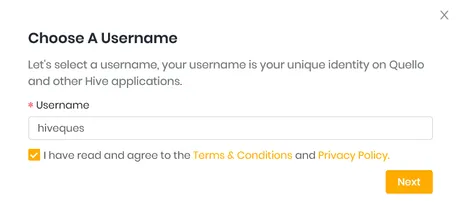
Select a unique username for your Quello and Hive account. If you already have an existing Hive account, you don't need to Sign Up. Just go to "Sign In". After choosing a username click on "next".
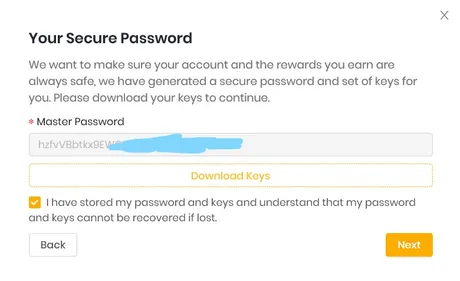
Here you'll find all types of keys (Active key, Owner Key, Posting Key, Memo Key) along with your master password which you need to use your Hive account and other Dapps as well. So download the keys, store it in a safe place and click on next.
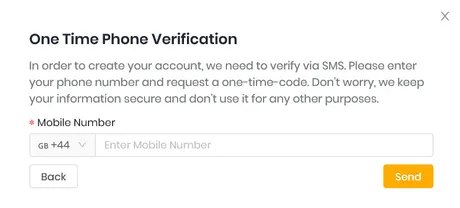
In the next window, you'll find an option to verify your mobile number. This is the last step of opening an account. They added mobile verification to prevent abuse and multiple sign-ups for a single user. They will send a verification code to your mobile number for verification.
Congrats! Your Quello and Hive Account has been created. You can now login to Hive Blog or any Dapps like peakD, Actifit, DCity, or Quello as well using Hivesigner or Keychain.
That means you just entered to the world of Hive Blockchain!
Note: It's not recommended to create more than one account using the same IP.
Best Features of Quello
I already told that Quello is a Decentralized Application based on Hive. Let's point out the main benefits of using Quello.
✅ You Can Earn by Posting Question and Answer
Unlike other Q&A websites such as Quora, you'll earn money for every upvote on Quello. But you will get your reward on Hive token just like you earn on Hive Blog or PeakD.
✅ Referral Bonus
Currently, Quello apply a 3% referral beneficiaries to the user who referred the user to Hive, this means that you can earn an unlimited amount of Hive from referrals and earn more based on how successful each individual you invite to Hive is.
Every time you refer existing Hive users to Quello you will be eligible to receive 2% of their rewards for questions and answers they create, this applied using beneficiaries in a similar method as described during sign up.
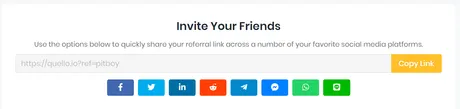
That means you'll not just earn for referring newbie to Hive or Quello, you'll earn a referral bonus from existing Hive users as well by referring them to Quello. Click here to learn more about the referral program.
Join on Quello now. I will be happy if you use my referral link to join - Click Here
✅ Set Beneficiaries
Quello recently updated and added the beneficiaries option. Now you can set any beneficiaries for your post reward. Leave it blank if you don't want to set any beneficiary.
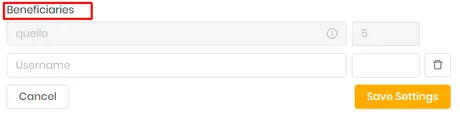
Remember: Quello take a small beneficiary to help fund the growth and development of the platform, this is never more than 5%. You can set other beneficiaries as well if you want. That means, for every question or answer Quello will get 5% of the post rewards.
✅ Post in Community
Here you can select whether you want to post your question on any Hive community or directly to your blog. While posting your question, you can change this setting according to your preference.
✅ Post Your Question as a Comment
Another awesome feature about Quello is you can actually post questions as a comment on Hive Blog.
Ok if you are already a regular Hive blog user than you know what I just meant! When you're joining to any Dapp by using Hivesigner and your Active key, you're permitting posting, voting, and lots other stuff. That means when you will post a question on Quello, it will be automatically posted on your blog.
But you don't want a question with just a few sentences (Or no description) posted on your blog. Right?
Everyone wants to keep their blog neat and clean. Quello allows you to post your question as a comment. And that comment will be posted on one of their assigned posts on Hive.blog. When people will upvote your question (Or answer as well) you'll still earn money.
Theoretically, we can simply say that, Quello is allowing us to earn Hive without actually posting on Hive.blog. I will show an example regarding this a little bit later.
✅ Social Sharing
You can easily share your question to major Social Media like Facebook, Twitter, Linkedin, etc to promote.
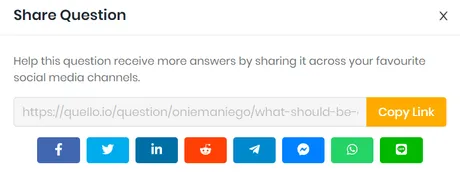
It's great to use centralized media to promote decentralization.
How to Ask a Question on Quello
There are not a lot of things to write about Quello. Because it is one of the most user-friendly sites which can be explored easily by anyone. Though I thought it would be great for newbie if I explain everything step by step. Click on *"Create Question" to create a new question.
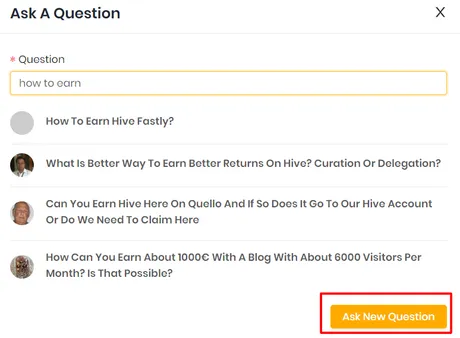
A window will open to write your question. As you can see in the screenshot, the finest thing is when you'll start writing text, it'll show all available related past questions as a suggestion. Click on ''ask new question".
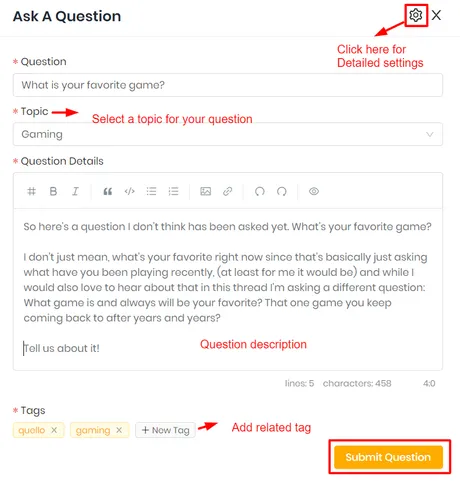
You'll find a window to select your question topic, add tags, provide a description, etc. In the right top corner, you'll find a "Setting" icon.
I strongly suggest you click on that icon for detailed settings before submitting your question.
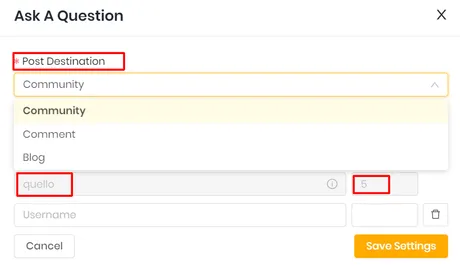
After clicking on settings you will find this window, where you'll decide you want to post on
- any community (like Quello, OCD, or Gems community),
- or directly to your Hive Blog under any tag
- or in a comment. (I already described it in Features)
No matter what option you select, it will be posted on your Hive blog profile along with Quello profile. So choose wisely how and where you want to see your question on Hive.
Below that you can see Quello is auto set as beneficiary of your post. Quello will earn 5% of your post reward. Quello take a small beneficiary to help fund the growth and development of the platform, this is never more than 5%. You can set other beneficiaries as well if you want.
After saving your desired setting you're ready to submit your question.
It's so easy. Right?
I hope you got a basic guide on - How to use Quello. I tried to explain every aspect of @quello simply. A month ago, I even doubted the success of Quello. I am amazed to see how they changed and upgraded everything within a month! Now I believe, I will really see Quello at the top of the question-answer platform soon!
Return from Decentralized Q&A Platform: Best Ultimate Beginners Guide to Quello to pitboy's Web3 Blog