
As a non-native English blogger, I know well how hard it is to think, analyze and write a perfect blog post. A blogger works hard to write a perfect post for his blog, and the last thing he/she wants that not to be seen by anyone.

To promote your blog post you follow so many ways, and writing on other blogs and use your post link to that post is one of them. But is it a good idea to post the same thing to the other blogs or websites in terms of SEO?
No, it's not!
It will be counted as duplicate content, and it's harmful to the SEO of your blog or article. It's not a safe technique. Let me explain.
You may post the same thing all over the internet. You can copy and paste your writings to your Facebook, Medium, or wherever your want. Nobody is going to blame you; it's your post.
But if you want to rank your article on Google, then you shouldn't post the same article to another website. Google isn't going to list all of the sites. Google will figure out and try to index the original one to the search engine and penalize the duplicate content.
Now you could say, all posts are written by me and posted on my different blogs, why Google will penalize my content! For example, if you post the same thing to your Hive Blog profile or Medium profile, you could be surprised if Google chooses not to show either Hive's post or Medium's post in the search engine.
You and maybe your friends know that the post was written by you. But Google doesn't know it. And Google crawl bot thinks only one post is original and others are plagiarized. And then Google penalize the other posts and may choose not to show other site's result in the search engine.
Normally Google chooses the first post as an original post, but all others are copied. But sometimes it shows copied post at first. If the other website has more PR(Page Rank) or DR(Domain Rank) than your blog, then Google search engine may show the Higher Ranked site's result at first. In that case, you aren't getting expected visitors to your site.
Give you a real-life example, this one actually happened to me. I posted a crypto-related article on Hive and reposted it to my Medium profile with my original post link.
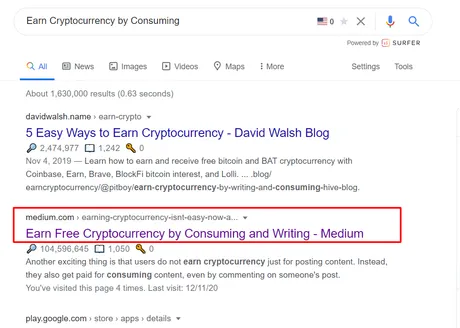
I thought it will drive more traffic to my original post on Hive. My target was to rank the Hive post on search engines. But the fun fact is - for some "keywords" Google ranked Medium on the search engine instead of my original post!
So, now you know well things may go wrong if you repost your original article to another place. So, don't do it. Write a new "guest post" for other sites instead of copy-pasting it.
Hold a moment! You can actually post the same content to other websites without violating any rules or hurting original content! How?
By using rel=canonical!
A canonical URL is the URL of the page that Google thinks is most representative from a set of duplicate pages on your site. For example, if you have URLs for the same page (for example: example.com?dress=1234 and example.com/dresses/1234), Google chooses one as canonical. Note that the pages do not need to be absolutely identical; minor changes in sorting or filtering of list pages do not make the page unique (for example, sorting by price or filtering by item color). Source
Using Rel=canonical means, you're telling Google that the post or part of the post isn't written by you and give the credit to the original one.
 *[Source](https://moz.com/blog/complete-guide-to-rel-canonical-how-to-and-why-not)*
Have a look at the screenshot to get some idea. Suppose I am copied a news from CNN and posting it to my blog. To avoid being penalized by Google I used rel=canonical and told the search engine not to index my site as credit goes to the original CNN's post.
Hope you got some basic idea about rel=canonical. Soon I will write a detailed post about it.
In the end, I should say reposting won't help you to generate more traffic to your website or blog post. It's very rare that people got tons of visitors from reposting. So it's better if you write a new guest post and add a backlink to your original post.
And if you really want to repost then make sure that you use a rel=canonical.
Check out my other SEO related articles on Hive -
-
Hive SEO: Write Perfect Title and Meta Descriptions for More Traffic - Click Here
-
Top 3 Nofollow Backlink Sites to Drive More Traffic to Your Article - Click Here
-
How Updating Your Old Steemit Content Can Help With Hive's SEO Rankings - Click Here
-
Top 10 Tips to Write SEO Friendly Article - Click Here
-
Importance of High-Quality Content in SEO - Click Here
-
What is Backlink and How Does it Work? - Click Here
-
Simple method to add Alt Text to your Hive images - Click Here
-
How I ranked on Google within 24 hours? - Click Here
-
Seo for beginners - How to do it. Click Here
-
How to do Keyword Research? Click Here
-
How to check plagiarism? Click Here
-
Some Basic SEO term - Seo for Beginners Click Here
-
List of Free Online photo editing websites. Click Here
-
How to Make perfect Title or H1 tag for SEO? Click Here
-
Top 7 websites for copyright-free images Click Here
-
Simple Method to Add Alt Text to Your Hive Images - Click Here
Return from Reposting Blog Content on Other Websites - Is It Safe? to pitboy's Web3 Blog